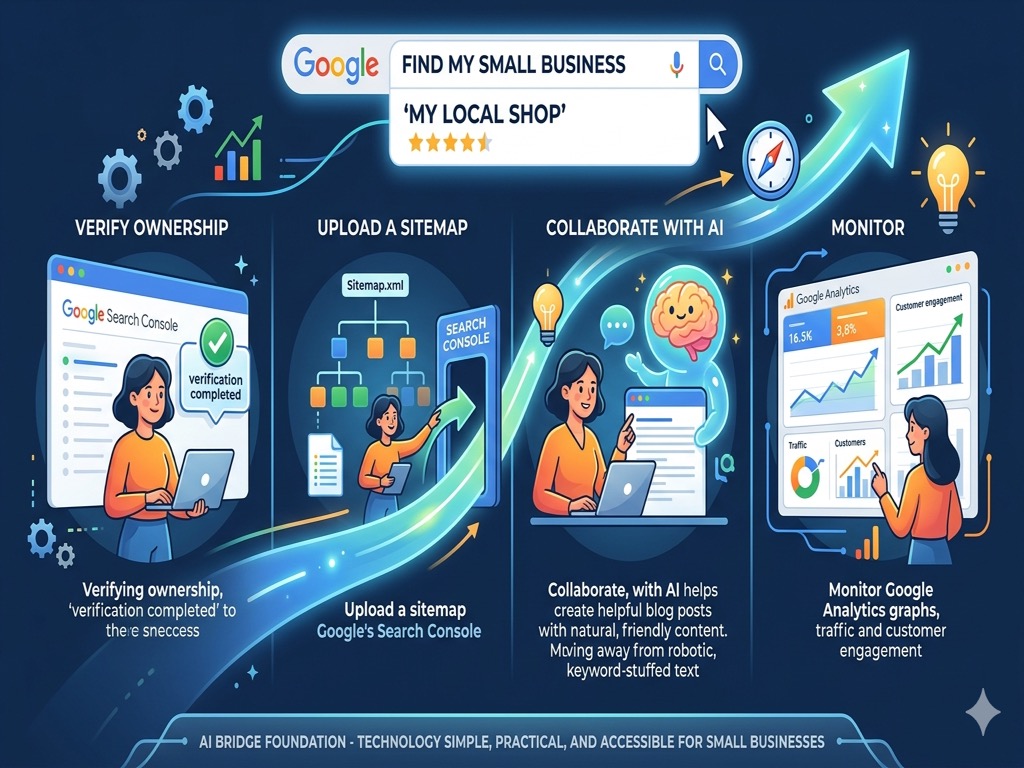
The Invisible Storefront: A Small Business Guide to Getting Found on Google
Every small business owner knows the feeling of opening a new location. You pick the right spot, you paint the walls, and you hang the sign. But in the digital world, simply building a website doesn't mean the "sign" is visible to anyone passing by. You might have the most beautiful site in your industry, but if Google hasn't been properly introduced to it, your business is effectively sitting in a dark alley with the lights off.
The good news is that the digital "street lights" are free to turn on. You don't need a degree in computer science or a massive marketing budget to make your business show up when someone types a search. You just need to complete a few specific digital handshakes. By following this narrative guide, you can take your website from a ghost town to a community hub in a single afternoon.
The Official Introduction
The journey begins with an introduction. Google is constantly scanning billions of pages, but it prioritizes the ones it knows are verified and active. This is where Google Search Console comes in. Think of this tool as your direct line of communication with the search engine's headquarters. It is the only place where Google will talk back to you, telling you exactly how it sees your site and, more importantly, what is stopping it from showing your pages to customers.
To start this process, you head to the Search Console website and sign in with your business Gmail. You'll be asked to "Add a Property." Once you enter your URL, Google will ask you to prove you own it. This is the part that intimidates most people, but it is actually quite simple. Most website builders like Wix or Shopify have a specific "SEO" or "Integration" section where you can paste a small snippet of code. This code doesn't change how your site looks; it acts like a digital ID card that tells Google you are the rightful owner.
Once verified, the magic starts to happen behind the scenes. Within a few days, Google will start showing you a "Performance" report. This is a goldmine of information. It will list the exact phrases people typed to find you. You might find that people are searching for "emergency repair near me" rather than the formal "professional maintenance services" you have on your homepage. This insight allows you to stop guessing and start speaking the same language as your customers.
Providing the Roadmap
Once you've introduced yourself, you need to show Google around. Imagine inviting a guest to a large building but giving them no map and locking half the doors. They would get frustrated and leave. Google behaves the same way. It uses "crawlers" to explore your site, and you want to make their job as easy as possible. This is where your Sitemap and your Robots.txt file come into play.
A sitemap is exactly what it sounds like: a simple file that lists every important page on your website. For most modern platforms, this file is created for you automatically. You can usually find it by adding /sitemap.xml to the end of your website address. Once you find that link, you go back into your Google Search Console, click on the "Sitemaps" tab, and paste the link. This is the equivalent of handing Google a GPS for your business. It ensures that your "About" page, your "Services" page, and your "Contact" page are all indexed and ready to be shown to the world.
While the sitemap shows Google where to go, the robots.txt file tells it where to stay away from. Every website has "backstage" areas—like your admin login page or private folders—that shouldn't show up in search results. A properly configured robots.txt file keeps the search engine focused on your high-value content. You can check yours by typing /robots.txt after your domain name. A standard, healthy file for a small business might look like the code block below.
User-agent: *
Disallow: /admin/
Disallow: /login/

Sitemap: https://www.yourbusiness.com/sitemap.xml
This simple text file tells all search engines to ignore your private admin areas but specifically points them toward your sitemap so they can find your public content faster. If you ever see a line that says Disallow: / with nothing after the slash, it means you are telling Google to ignore your entire site. If you see that, change it in your site settings immediately.
Writing for Humans, Aided by Intelligence
Now that the technical "plumbing" is set up, we move to the most important part: the content. Google's primary goal is to provide the most helpful answer to a user's question. If your website is just a digital brochure with two sentences about what you do, Google won't think you are very helpful. You need to provide value.
This is where many business owners hit a wall. Writing articles or detailed service descriptions takes time and creative energy that most people don't have after a long workday. This is exactly where Artificial Intelligence becomes your most valuable employee. You can use an AI assistant like Gemini to brainstorm and draft content that speaks directly to your customers' needs.
Instead of trying to "rank for keywords," try to "answer questions." Think about the three most common questions customers ask when they call you. Perhaps it's "How do I know if my water heater is failing?" or "What should I look for in a local landscaper?" Take those questions to an AI and ask it to help you draft a helpful, professional response. You aren't using the AI to cheat; you are using it to translate your professional expertise into written words that Google can understand. When you post these answers on your site, Google sees that you are an authority in your field, and it will reward you with higher visibility.
Measuring Success and Moving Forward
The final piece of the puzzle is understanding who is visiting and what they are doing. Google Analytics is the tool that provides this clarity. Once installed, it allows you to see the "heartbeat" of your business. You might discover that 80% of your visitors are looking at your site on a mobile phone while they are on the go. This tells you that your "Call Now" button needs to be very easy to tap with a thumb.
Setting up Analytics follows a similar path to the Search Console. You create a free account, receive a "Measurement ID"—which usually starts with the letter G—and paste that ID into your website's settings. Within twenty-four hours, you will see a live dashboard of your traffic. Don't get bogged down in every single chart. Focus on where people are coming from and which pages keep them interested the longest. This data is the compass that will guide your future marketing efforts.
Getting your small business found on Google is not a one-time event, but a foundation you build. By verifying your ownership, providing a clear roadmap, using AI to generate helpful content, and monitoring your results, you are doing more than just "fixing a website." You are building a digital asset that works for you 24 hours a day. The total cost for all these tools is zero dollars, and the time investment is just a few hours of focused effort.
This guide is part of the AI Bridge Foundation's commitment to making the digital economy accessible to everyone. We believe that technology should be a bridge, not a barrier. When you simplify the technical side, you free yourself up to do what you do best: running your business and serving your community.