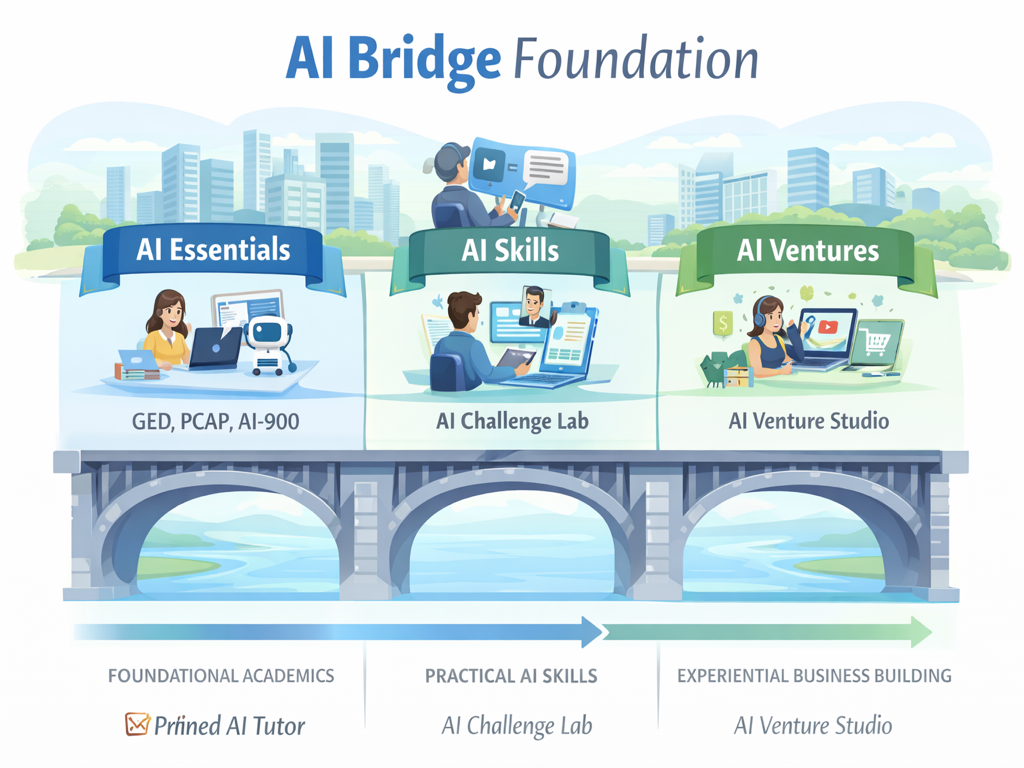
From Learning to Earning with AI
Last spring, a woman named Denise sat in the parking lot of a public library in Stockton, California, staring at a letter from the IRS. She'd been staring at it for three days. The letter was two pages of dense legal language, and somewhere inside it was a number she owed—or maybe didn't owe—but she couldn't tell which. She didn't have an accountant. She couldn't afford one. She was a home health aide making $17 an hour, and the letter felt like a wall she couldn't climb.
Denise's problem wasn't intelligence. It was access. She needed someone to sit with her, explain the letter in plain English, and help her figure out what to do next. That kind of help used to require a professional who charged $200 an hour. Today, it requires a conversation with AI.
That's the starting point for everything AI Bridge Foundation builds.
Stage 1: Pinned AI Tutor — Learning That Doesn't Reset
Most people use AI the way they use a search engine: ask a question, get an answer, close the tab. But learning doesn't work that way. Real understanding builds over days and weeks, through repetition, mistakes, and gradual clarity.
Pinned AI Tutor is a persistent study partner. It remembers what you've already covered, where you got stuck, and what you're working toward. A GED student preparing for the science section doesn't start over every time she opens the app. The AI picks up where they left off—"Last time you were working on chemical reactions. You had the conservation of mass down but were shaky on energy transfer. Want to start there?"
The sessions are scoped to specific subjects and exams—GED, PCAP, AI-900—so the AI stays focused instead of wandering into irrelevant territory. Community forums let learners compare notes and share strategies with each other. And because every interaction is a hands-on AI experience, students build practical AI literacy just by studying.
Stage 2: AI Challenge Lab — Solving Problems That Actually Keep You Up at Night
Knowing how AI works is one thing. Using it to solve a problem that's been sitting on your kitchen counter for two weeks is something else entirely.
AI Challenge Lab takes real problems—the kind that cause actual stress—and walks you through solving them with AI as your guide. That IRS letter Denise couldn't decode? That's a Challenge Lab scenario. So is the $4,200 medical bill with charges you don't recognize. So is the job application you've rewritten six times and still haven't submitted.
Each scenario has an AI coach that doesn't just hand you an answer. It walks you through the reasoning: why this line on the bill matters, what this legal phrase actually means, how to write an appeal letter that gets read. You learn the skill while solving your actual problem. By the time you finish, you're not just less stressed—you're more capable. And the next confusing letter that shows up in your mailbox doesn't feel like a wall anymore.
Stage 3: AI Venture Studio — Building Something of Your Own
The first two stages teach you to learn and to solve problems. The third stage asks a bigger question: what if you could build something?
AI Venture Studio is where learning turns into earning. It guides you through starting a real small business—not a theoretical exercise, but the actual messy process of figuring out what to sell, how to price it, how to find customers, and how to keep the lights on when things get slow.
The ventures are practical and grounded: a landscaping business, a property management side hustle, a local media production service. Each one walks you through the full journey—from understanding the trade and getting licensed, to pricing your work, finding your first customers, and eventually growing. AI is a tool in that journey, not the subject of it. You use ChatGPT to draft a quote, Google Sheets to track expenses, Canva to make a flyer. The AI helps you move faster, but the decisions are yours.
The point isn't to promise easy money. It's to show you what running a business actually looks like, and to give you a safe space to try it before the stakes are real.
Tools Born from Real Problems
Sometimes a Challenge Lab scenario reveals a problem so common that it deserves its own dedicated tool. That's where AI Speech Feedback and What The Letter Said came from.
AI Speech Feedback helps you practice speaking—for job interviews, presentations, or just building confidence in English. It listens, gives you real-time feedback on clarity and pronunciation, and helps you improve without the pressure of a live audience.
What The Letter Said takes a photo of a confusing document—a government notice, a medical bill, a legal letter—and translates it into plain language you can actually understand. It works in multiple languages, because a letter from the IRS is just as confusing in Spanish if nobody explains what it means.
These tools exist because someone, somewhere, was stuck. And now they're not.